Disclosure: This page contains affiliate links. As an Amazon Associate we may earn from qualifying purchases, at no extra cost to you. Rankings are independent of those commissions.
Choosing the best smartwatch for seniors is about more than just style or brand. For many older adults, the right watch brings peace of mind, helps track health, and makes daily living easier. The right pick is easy to set up, simple to use, and reliable in emergencies. Seniors and their families want features that work quietly in the background, like fall detection, big readable text, and reminders for medication or appointments.
Today’s smartwatches are much more than step counters. They can call for help, guide you home with GPS, and even track your sleep or heart health. For seniors, these features can be life-changing. Still, not every smartwatch is a good fit. Some are too complicated, too small to read, or need charging too often. That’s why it’s important to look beyond the marketing and focus on what really matters for older users.
This guide looks at smartwatches from every angle that matters to seniors. We considered battery life, display size and clarity, fall detection, emergency features, phone compatibility, and how easy it is to get started. Each watch on this list stands out for something special, whether it’s long battery life, a big bright screen, or a simple interface. We also point out drawbacks, so you can decide what’s right for you or your loved one.
Every watch here was chosen because it balances features with simplicity. We focused on models with big text options, straightforward menus, and reliable health and safety tools. Some are great for fitness, others for health monitoring, and a few for emergency support. You’ll see what sets each apart, who should skip it, and what to expect from setup to daily use.
If you’re shopping for yourself or helping a parent or grandparent, this roundup will help you compare the best smartwatches for seniors in 2026. You’ll find practical details, honest tradeoffs, and tips to make setup and daily use easier.
Expert ranking
01
Apple Apple Watch Series 9
8.5
Water resistant to 50 meters (WR50)Up to 18 hourswatchOS 10Retina LTPO OLED, up to 2000 nits
The Apple Watch Series 9 is a top choice for seniors who want both safety and smart features. This watch is available in 41mm or 45mm case sizes, which means it fits a wide range of wrists comfortably. The case size refers to the width of the watch body across the wrist, so you can pick the one that feels best. The always-on Retina display is bright and crisp, making it easy to see the time, notifications, and health stats even in direct sunlight. Apple’s focus on accessibility shines here, with large text options, high-contrast faces, and voiceover support for those with vision challenges.
One of the biggest reasons seniors choose the Series 9 is its safety features. Fall detection works in the background, automatically sensing a hard fall and prompting you to respond. If you don’t, it can contact emergency services and share your location. Emergency SOS is just a button press away, and the watch can also alert trusted contacts. The Series 9 tracks heart rate, blood oxygen, and can even take an ECG, which is useful for anyone with heart concerns. It also tracks steps, calories, and sleep, so you can keep tabs on your overall health.
Setup is straightforward for iPhone users. The watch pairs over Bluetooth and walks you through the process step by step. If you’re not familiar with Apple products, you may want a family member to help with the initial setup. Apple’s Family Setup lets caregivers set up the watch for someone who doesn’t have their own iPhone, which is especially helpful for seniors who don’t use smartphones. Once set up, the watch is easy to navigate with swipes, taps, and Siri voice commands. The interface is clean, with large icons and a simple menu structure.
Battery life is up to 18 hours, which means you’ll need to charge it every night. Using features like GPS, cellular calls, or the always-on display can shorten battery life, so it’s important to get in the habit of charging at the same time each day. The magnetic charger is simple to use, but those with limited dexterity may need a charging stand for easier placement. The Series 9 has onboard GPS, so you can track walks or runs without carrying your phone. This is great for independent seniors who like to stay active outdoors.
The Series 9 works only with iPhones, so Android users should skip it. It’s also not the best pick for those who want a watch that lasts several days between charges. Still, for iPhone users who want a full-featured smartwatch with top safety tools, the Series 9 is a strong choice. Its biggest benefit is the all-in-one health and safety package, while its main drawback is the need for daily charging and exclusive Apple compatibility. Seniors who want a watch that “just works” and offers peace of mind will appreciate the Series 9, but those who don’t want to charge nightly or use Android should look elsewhere.
Pros
Bright, always-on display
Fast S9 chip with on-device Siri
Comprehensive health tracking
Cons
Battery life still just one day
Few upgrades over Series 8
Who it is for
iPhone users seeking a premium smartwatch
Fitness and health tracking enthusiasts
Skip if
You want multi-day battery life
You already own Series 8 or Ultra
Apple Apple Watch Series 9 FAQs
Does the Apple Watch Series 9 support fast charging?
Yes, it supports fast charging with the included USB-C cable and compatible power adapter.
Can I use the Apple Watch Series 9 without an iPhone?
No, initial setup and most features require pairing with an iPhone.
Expert ranking
02
Garmin Venu 3
8.4
It balances Garmin fitness tracking with calls, a bright display, and manageable case sizes.
Product image from Amazon. Not a photo from our testing.
The Garmin Venu 3 is a fitness and health-focused smartwatch that balances advanced tracking with a simple, easy-to-use interface. Available in 41mm or 45mm case sizes, it’s lightweight and comfortable for all-day wear. The bright AMOLED display supports large fonts and high-contrast faces, making it easy to read stats at a glance. Garmin’s proprietary OS is designed for straightforward navigation, focusing on health, steps, and activity rather than a clutter of apps. The Venu 3 is a great choice for seniors who want to stay active and keep an eye on their health without being overwhelmed by features.
Safety features include fall detection, emergency assistance, and all-day heart monitoring. If the watch detects a fall or a sudden health issue, it can send your location to emergency contacts. The Venu 3 also tracks sleep, stress, and offers guided breathing exercises, which can help manage anxiety or promote relaxation. The watch is water-resistant, so it can be worn in the shower or while swimming. The display is always clear, even in bright sunlight, and the touchscreen is responsive for easy navigation.
Battery life is a highlight, lasting up to 14 days on a single charge with normal use. Using GPS for walks or workouts will shorten battery life to about 20 hours of continuous use. The Venu 3 has onboard GPS, so you can leave your phone at home when going for a walk or run. This is especially helpful for seniors who want independence or don’t always carry a phone. Charging is simple with the included cable, and the watch charges quickly, so you don’t have to wait long between uses.
The Venu 3 works with both iPhones and Android phones, making it a flexible choice for any user. Setup is simple with the Garmin Connect app, which guides you through pairing and customization. Syncing is fast, and the app provides clear summaries of your health data. Garmin’s app store is smaller than Apple or Samsung’s, so you won’t find as many third-party apps, but all the basics for health and fitness are covered. The interface is clean, with large icons and easy-to-read menus.
The biggest benefit is the long battery life, which means less worry about charging and more time focusing on your health. The main drawback is the limited app selection, so those who want lots of extra features or advanced smartwatch functions may want to look elsewhere. Seniors who want reliable health tracking, fall detection, and a watch that rarely needs charging will find the Venu 3 appealing. Those who want more apps or smartwatch extras may want to skip it.
Pros
Up to 14 days of battery
Speaker and microphone for calls
41mm and 45mm case choices
AMOLED display and Garmin fitness tracking
Cons
No full maps
No listed dual frequency GPS
Limited Connect IQ app selection
Who it is for
Mixed gym and outdoor training
Garmin users who also want wrist calls
Skip if
You need maps and advanced race tools
You want Wear OS apps
Dual frequency GPS is essential
Garmin Venu 3 FAQs
Does the Garmin Venu 3 have a speaker and microphone?
Yes. It supports calls through a connected phone, while the Forerunner 965 does not include a speaker or microphone.
Should I choose the Venu 3 or Forerunner 965?
Choose the Venu 3 for mixed workouts, calling, and a 41mm case option. Choose the Forerunner 965 for maps, dual frequency GPS, and more focused race training.
How long does the Venu 3 battery last?
Garmin lists up to 14 days. GPS sessions and display settings can shorten that estimate.
Is the Venu 3 suitable for swimming?
Its 5 ATM water resistance makes it suitable for pool swimming. It is not presented here as a dive watch.
The Fitbit Sense 2 is a health-first smartwatch with a focus on simplicity and comfort. The 41mm case size fits most wrists well, and the lightweight design means you can wear it all day and night. The AMOLED display is bright, with customizable faces and large text options for easy reading. Fitbit’s OS is known for its simple, swipe-based navigation, making it easy for seniors to check health stats, notifications, or set reminders with just a few taps.
Fall detection is now included, a big step forward for seniors who want safety alerts. The Sense 2 also tracks heart rate, stress, sleep, and can detect signs of irregular heart rhythm (AFib). The watch provides reminders to move, hydration tracking, and even guided breathing sessions to help manage stress. The Sense 2 is water-resistant, so you can wear it in the shower or pool without worry. The display is easy to see in all lighting conditions, and the menus are simple to navigate.
Battery life is a strong point, lasting 6 or more days on a full charge. Using built-in GPS for frequent walks or workouts will shorten battery life to about 5 hours of GPS use per charge, but most users find they only need to charge once a week. The Sense 2 has onboard GPS, so you can track outdoor activity without your phone. Charging is easy with the included magnetic cable, and the watch charges quickly for minimal downtime.
The Sense 2 pairs with both Android and iPhones via the Fitbit app. Some features, like quick replies to messages, are only available on Android, but health tracking works on both platforms. Setup is easy, with clear instructions and a step-by-step guide in the app. Syncing is usually fast, and the app provides a simple summary of your health data. Fitbit’s app selection is more limited compared to Apple or Samsung, but all the basics are covered.
A major benefit is the balance of health tracking and long battery life, making it a great choice for seniors who want to focus on wellness without worrying about charging every night. The main drawback is that some features require a Fitbit Premium subscription, and the app store is smaller than competitors. Seniors who want a simple, health-focused watch with minimal charging will like the Sense 2, while those wanting lots of extra apps or advanced smartwatch features may prefer a different model.
Skip the Fitbit Sense 2 if you need a different phone match, a longer charge, or a feature this model leaves out.
Pros
Comprehensive health tracking
Long battery life
Comfortable, lightweight design
Cons
Limited third-party apps
No onboard music storage
Who it is for
Health-focused users
Stress and sleep tracking
Skip if
You want robust smartwatch apps
You need LTE or music storage
Fitbit Sense 2 FAQs
Does the Fitbit Sense 2 support Google Assistant?
No, the Sense 2 only supports Amazon Alexa for voice commands.
Can you reply to notifications from the watch?
You can send quick replies to messages if paired with an Android phone.
Expert ranking
04
Withings ScanWatch 2
8.4
5 ATMUp to 30 daysProprietary (Withings Health Mate compatible)PMOLED subdial with analog hands
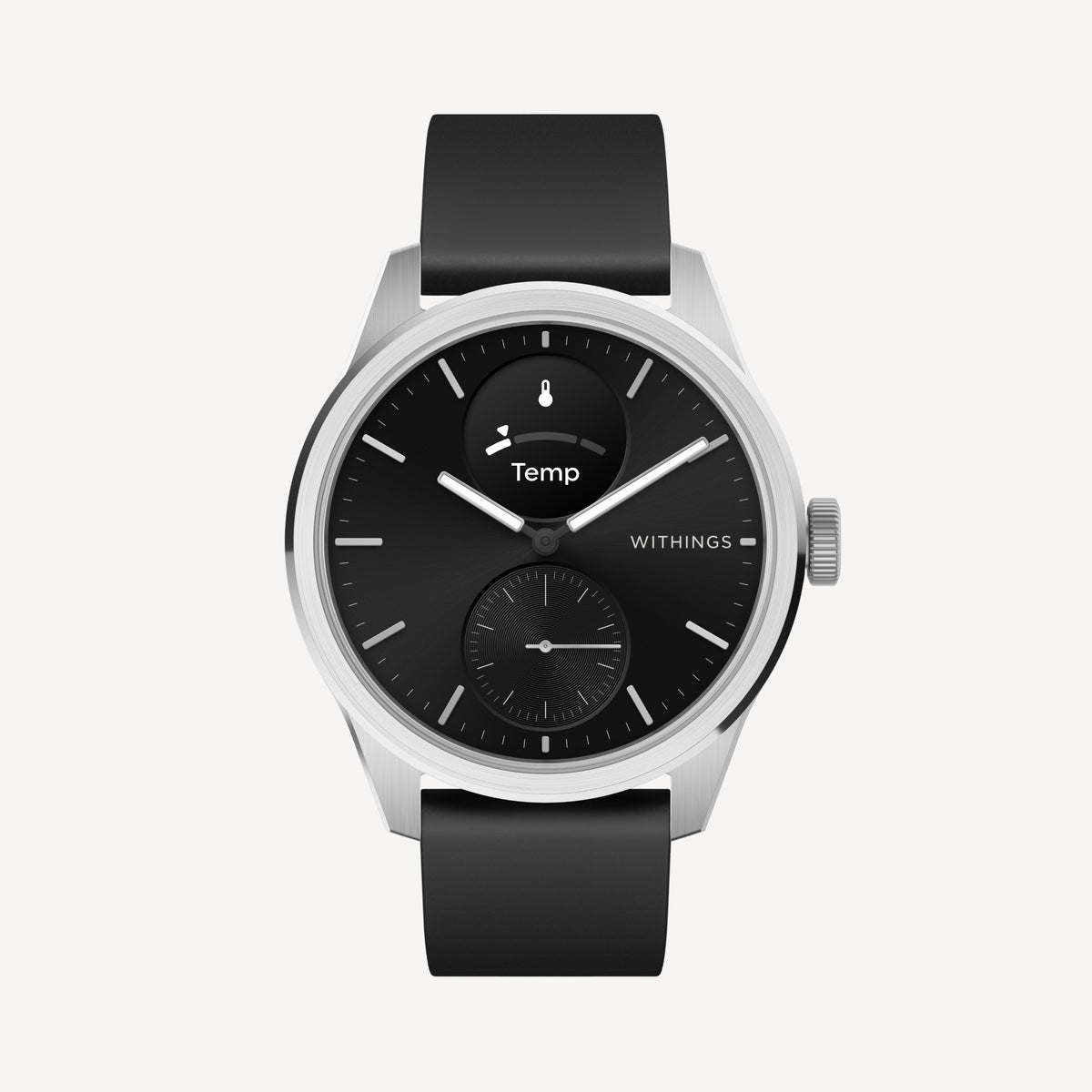
The Withings ScanWatch 2 is a unique choice, blending classic analog style with smart health features. Available in 38mm or 42mm case sizes, it’s slim and lightweight, making it comfortable for all-day wear. The main dial shows the time, while a small digital display shows health stats and notifications in big, clear text. This hybrid design is perfect for seniors who want the look of a traditional watch with the benefits of smart health tracking.
The ScanWatch 2 tracks heart rate, blood oxygen, sleep, and activity automatically. It can detect irregular heart rhythms and send alerts to your phone. The watch is water-resistant, so you can wear it in the shower or while swimming. While fall detection is not built-in, the ScanWatch 2 excels at advanced health monitoring, including long-term tracking of heart and respiratory health. The analog hands make it easy to check the time at a glance, while the digital screen provides health data without being overwhelming.
Battery life is a standout feature, lasting up to 30 days on a single charge. Using continuous health tracking or frequent notifications can shorten this, but it still outlasts most smartwatches by a wide margin. Charging is simple with the included cable, and you only need to do it once a month for most users. The ScanWatch 2 uses your phone’s GPS for outdoor tracking, so you’ll need to bring your phone on walks or runs if you want to record your route.
The ScanWatch 2 works with both iPhones and Android phones, syncing with the Withings Health Mate app. Setup is straightforward, with clear instructions and a simple pairing process. The app provides easy-to-read summaries of your health data and can share information with caregivers or doctors if needed. The hybrid design means less fuss for those who prefer a traditional look, and the watch is easy to wear with any outfit.
The key benefit is the long battery life and simple, classic design that doesn’t draw attention as a “tech gadget.” The main drawback is the lack of onboard GPS and fall detection, which may be important for some seniors. Those who want a low-maintenance, health-focused watch without flashy screens will appreciate the ScanWatch 2. Seniors who need fall alerts or want to track outdoor walks without a phone may want to skip it.
Compared with the Apple Apple Watch Series 9, this one stands out when its case size, battery, and phone support fit how you wear a watch.
Pros
Exceptional battery life
Advanced health tracking features
Classic analog design with smart notifications
Cons
Limited third-party app support
No built-in GPS
Who it is for
Health-conscious users
Fans of hybrid smartwatches
Skip if
You want full smartwatch app support
You need onboard GPS for workouts
Withings ScanWatch 2 FAQs
Does the Withings ScanWatch 2 support contactless payments?
No, the ScanWatch 2 does not offer NFC or contactless payment features.
Can I track my workouts without my phone?
The ScanWatch 2 does not have built-in GPS, so you need your phone nearby for accurate location tracking.
Expert ranking
05
Amazfit GTR 4
8.4
5 ATMUp to 14 daysZepp OS 2.01.43" AMOLED, 466x466 pixels
The Amazfit GTR 4 is a fitness smartwatch that stands out for its battery life and affordability. The 46mm case size is large, making it easy to read, but may feel bulky on smaller wrists. The AMOLED display is bright and clear, with customizable watch faces and large icons for easy navigation. Zepp OS 2.0 keeps things simple, with swipe gestures and quick access to health stats, notifications, and settings. The GTR 4 offers fall detection, heart rate monitoring, sleep tracking, and stress measurement, making it a well-rounded choice for active seniors.
One of the GTR 4’s biggest strengths is its battery life, which lasts up to 14 days under normal use. If you use GPS for walks or workouts every day, expect to charge it more often, but most users only need to plug in once every two weeks. The watch has onboard GPS, so you can track your route and distance without needing your phone. This is great for seniors who enjoy walking or outdoor activities and want to feel safe while out and about. Charging is easy with the included magnetic cable, and the watch recharges quickly.
The GTR 4 pairs with both Android and iPhones via the Zepp app, and setup is usually quick and straightforward. The app walks you through pairing, customization, and syncing your health data. The watch supports notifications, alarms, reminders, and even has a built-in voice assistant for hands-free help. The app store is smaller than Apple or Samsung’s, but all the basics for health and fitness are covered. The watch is water-resistant, so you can wear it in the shower or while swimming.
A key benefit is the strong battery life and affordable price for the features offered. The main drawback is the large case size, which may not suit everyone, and a less extensive app ecosystem. Seniors who want a big, easy-to-read display and don’t want to charge often will enjoy the GTR 4. Those with smaller wrists or who want more apps should look elsewhere. The watch is best for seniors who value fitness tracking, long battery life, and simple navigation over a wide range of extra features.
Skip the Amazfit GTR 4 if you need a different phone match, a longer charge, or a feature this model leaves out.
Pros
Excellent battery life
Bright AMOLED display
Comprehensive fitness tracking
Cons
Limited third-party app support
No NFC payments in some regions
Who it is for
Fitness enthusiasts seeking long battery life
Users wanting a stylish, versatile smartwatch
Skip if
You need robust third-party app support
You require LTE or advanced smartwatch features
Amazfit GTR 4 FAQs
Does the Amazfit GTR 4 support phone calls?
Yes, it supports Bluetooth phone calls when connected to your smartphone.
Can I use third-party apps on the Amazfit GTR 4?
Third-party app support is limited compared to Wear OS or Apple Watch.
Expert ranking
06
Medical Guardian MGMove
8.3
Product photo not on file yet
Splash resistant (not swim-proof)Up to 24 hoursCustom (proprietary)1.3-inch color touchscreen
The Medical Guardian MGMove is designed with seniors’ safety as the top priority. The 44mm case is sturdy and easy to wear, and the touchscreen features large icons for simple navigation. The custom operating system keeps things focused on safety, without extra apps or distractions. MGMove offers built-in fall detection, 24/7 emergency monitoring, and medication reminders, making it a strong choice for seniors who want peace of mind and support.
Unlike most smartwatches, the MGMove is a standalone device and does not require a smartphone to work. This is ideal for seniors who don’t use or want a phone. The watch includes two-way communication with caregivers or emergency services directly from the wrist, so help is always close. The emergency button is easy to find and press, and the watch can automatically alert emergency responders if a fall is detected and you don’t respond.
Battery life is up to 24 hours, so daily charging is necessary. Using emergency features, GPS, or frequent communication will drain the battery more quickly. The watch has onboard GPS for location tracking, which is vital for emergency responders to find you quickly. Charging is straightforward, and the included dock makes it easy to place the watch correctly, even for those with limited dexterity. The display is bright and clear, with big text and simple menus.
Setup is simple and often handled by a caregiver or family member. The watch is pre-configured for emergency support, so there’s no need to download extra apps or connect to a phone. The interface is designed for ease of use, with clear prompts and voice guidance for common tasks. The MGMove is water-resistant, so it can be worn in the shower or during daily activities without worry.
The main benefit is the dedicated emergency support and fall detection, with no smartphone required. The drawback is short battery life and limited features beyond safety and reminders. Seniors who want a safety-first device without smartphone complexity should consider MGMove. Those looking for fitness tracking, a wide range of apps, or multi-day battery life should skip it. The MGMove is best for those who need reliable emergency support and simple reminders, rather than a full-featured smartwatch.
Pros
Dedicated medical alert features
Easy-to-use interface for seniors
24/7 emergency monitoring
Cons
Limited smartwatch functionality
Bulky design
Who it is for
Seniors needing medical alert support
Users prioritizing safety over smart features
Skip if
You want advanced fitness tracking
You prefer a sleek, stylish smartwatch
Medical Guardian MGMove FAQs
Does the MGMove require a smartphone to work?
No, the MGMove operates independently and does not require a paired smartphone.
Can the MGMove track steps or heart rate?
It tracks basic steps but does not offer advanced fitness or heart rate monitoring.
Expert ranking
07
Garmin Venu Sq 2
8.3
5 ATMUp to 11 daysProprietary (Garmin OS)1.41-inch AMOLED, 320 x 360 pixels
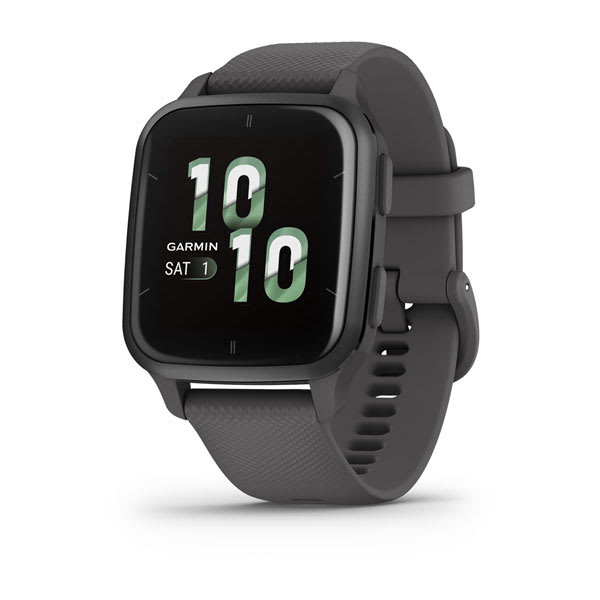
The Garmin Venu Sq 2 is a budget-friendly fitness smartwatch that focuses on simplicity, comfort, and battery life. The 40mm case is slim and lightweight, making it comfortable for most wrists, including those who prefer a less bulky watch. The color display is easy to read, with customizable watch faces and large text options for better visibility. Garmin’s proprietary OS is designed for straightforward navigation, with simple menus, swipe gestures, and big icons.
The Venu Sq 2 tracks heart rate, sleep, steps, and stress automatically. Safety features include emergency assistance, which can alert contacts if you need help, but fall detection is not included. The watch is water-resistant, so you can wear it in the shower or while swimming. The display is bright and clear, making it easy to check your stats throughout the day. The watch also offers guided breathing exercises and reminders to move, helping seniors stay active and relaxed.
Battery life is strong, lasting up to 11 days on a single charge with normal use. Using GPS will reduce battery time to around 26 hours of continuous use, but most users only need to charge once a week. The Venu Sq 2 has onboard GPS, so you can track outdoor activity without your phone. Charging is easy with the included cable, and the watch charges quickly for minimal downtime. The watch is comfortable enough to wear overnight for sleep tracking.
The Venu Sq 2 works with both iPhones and Android phones via the Garmin Connect app. Setup is simple, with clear instructions and a step-by-step pairing process. The app provides easy-to-read summaries of your health data and can share information with caregivers if needed. Garmin’s app store is smaller than Apple or Samsung’s, but all the basics for health and fitness are included. The interface is clean and easy to use, with large buttons and simple menus.
The main benefit is the long battery life and easy setup, making it a good choice for seniors who want health tracking without frequent charging. The drawback is the lack of fall detection, which may be a dealbreaker for some. Seniors who want a reliable everyday watch for activity and health tracking will like the Venu Sq 2. Those who need fall alerts or a wider range of apps should consider another option. The Venu Sq 2 is best for seniors who want a simple, comfortable watch that just works.
Compared with the Apple Apple Watch Series 9, this one stands out when its case size, battery, and phone support fit how you wear a watch.
Skip the Garmin Venu Sq 2 if you need a different phone match, a longer charge, or a feature this model leaves out.
Pros
Bright AMOLED touchscreen
Excellent battery life
Comprehensive fitness tracking
Cons
No onboard music storage (base model)
Limited third-party app support
Who it is for
Fitness enthusiasts
Everyday health tracking
Skip if
You want advanced smartwatch apps
You need LTE or cellular connectivity
Garmin Venu Sq 2 FAQs
Does the Garmin Venu Sq 2 support contactless payments?
Yes, Garmin Pay is supported for contactless payments.
Can you reply to texts or take calls on the Venu Sq 2?
You can view notifications and send quick replies (Android only), but you cannot take calls directly on the watch.
Expert ranking
08
Samsung Galaxy Watch 6 Classic
8.2
5 ATM + IP68Up to 40 hoursWear OS 4 (Samsung One UI Watch)1.3" or 1.5" Super AMOLED, always-on, up to 2000 nits
The Samsung Galaxy Watch 6 Classic is a standout for seniors who use Android phones, especially Samsung models. Available in 43mm or 47mm case sizes, it offers a large, round display that’s easy to read. The rotating bezel is a unique feature, making it simple to scroll through menus without needing to swipe the screen. This is especially useful for seniors with limited dexterity or arthritis. The watch runs Wear OS 4 with Samsung’s One UI Watch, bringing a familiar Android feel and access to a wide range of apps through the Google Play Store.
Fall detection and emergency SOS are included, offering peace of mind for seniors or their families. The watch tracks heart rate, sleep, steps, and activity, plus more advanced metrics like ECG and blood oxygen for Samsung phone users. The Galaxy Watch 6 Classic is also water-resistant, so you don’t have to worry about wearing it in the rain or while washing hands. The big, bright display supports large text and high-contrast faces, making it easy to see notifications and health stats.
Setup is smooth for Android users, especially if you have a Samsung phone. The Galaxy Wearable app walks you through pairing and customization. For those new to smartwatches, the process is straightforward, but it helps to have someone familiar with Android nearby. The interface is clean, with big icons and simple menus. Voice commands are supported through Bixby or Google Assistant, so you can ask for information or send messages hands-free.
Battery life is up to 40 hours, but heavy use of GPS, cellular calls, or always-on display can reduce this. Most users find it lasts a day and a half before needing a charge. The magnetic charger is easy to use, but the large case size means it may feel heavy on smaller wrists. The watch has onboard GPS, so you can track walks, runs, or bike rides without carrying your phone. This is great for seniors who enjoy outdoor activities or want to feel safe when walking alone.
The Galaxy Watch 6 Classic pairs best with Samsung and other Android phones, but it can also work with iPhones (with fewer features and limited app support). Some health features, like ECG, only work with Samsung phones, so check compatibility before buying. The biggest benefit is the rotating bezel, which makes navigation easy for anyone who struggles with touchscreens. The main drawback is that battery life is still shorter than some fitness watches, and the watch may feel bulky for those with small wrists. Seniors who want a big, clear display and easy controls will appreciate this watch, but those who use iPhones or want the longest battery life may want to look elsewhere.
Skip the Samsung Galaxy Watch 6 Classic if you need a different phone match, a longer charge, or a feature this model leaves out.
Pros
Rotating physical bezel for navigation
Bright, sharp AMOLED display
Comprehensive health and fitness tracking
Cons
Battery life is only average
Limited app ecosystem compared to Apple
Who it is for
Android phone users seeking a premium smartwatch
Fans of traditional watch aesthetics with smart features
Skip if
You need multi-day battery life
You use an iPhone
Samsung Galaxy Watch 6 Classic FAQs
Does the Galaxy Watch 6 Classic work with iPhones?
No, it is only compatible with Android smartphones.
Can I swim with the Galaxy Watch 6 Classic?
Yes, it is water resistant up to 5 ATM and IP68 rated.
Expert ranking
09
Amazfit GTS 4
8.2
5 ATMUp to 8 daysZepp OS1.75-inch AMOLED, 390 x 450 pixels
The Amazfit GTS 4 offers a modern blend of style, health tracking, and battery life. The 42mm case is slim and rectangular, making it comfortable and stylish for most wrists. The AMOLED display is bright, with customizable faces and big text options for easy reading. Zepp OS keeps navigation simple, with swipe gestures and large icons that are easy to tap. The GTS 4 includes fall detection, heart rate monitoring, sleep tracking, and built-in GPS, making it a solid choice for seniors who want both safety and fitness features.
Battery life is up to 8 days under normal use, though frequent GPS use or health monitoring will reduce this. Most users find they only need to charge once a week, which is less hassle than daily charging. The watch has onboard GPS, so you can track walks and runs without your phone. Charging is simple with the included cable, and the watch recharges quickly. The GTS 4 is water-resistant, so you can wear it in the shower or pool without worry.
The GTS 4 pairs with both Android and iPhones using the Zepp app. Setup is straightforward, with clear instructions and a guided pairing process. The app provides summaries of your health data and allows customization of watch faces and notifications. The app selection is smaller than Apple or Samsung, but all the basic health and fitness features are included. The watch supports notifications, alarms, reminders, and a voice assistant for hands-free help.
A key benefit is the combination of health features, fall detection, and a slim design that looks good on any wrist. The main drawback is shorter battery life compared to some other fitness watches, especially with heavy GPS use, and a smaller app library. Seniors who want a stylish, easy-to-read watch with core safety features will appreciate the GTS 4. Those who want even longer battery life, more apps, or a larger display may want to skip it. The GTS 4 is best for seniors who want a modern look, simple navigation, and reliable health tracking.
Pros
Bright AMOLED display
Comprehensive fitness tracking
Long battery life
Cons
Limited third-party apps
No onboard music storage
Who it is for
Fitness enthusiasts
Everyday smartwatch users
Skip if
You need advanced app support
You want LTE connectivity
Amazfit GTS 4 FAQs
Does the Amazfit GTS 4 support Bluetooth calls?
Yes, it allows you to make and receive calls via Bluetooth when connected to your phone.
Can I use third-party apps on the Amazfit GTS 4?
The watch supports a limited selection of third-party apps through the Zepp app store.
Expert ranking
10
Apple Watch SE (2nd generation)
8.1
Product image from Amazon. Not a photo from our testing.
WR50 (50 meters)Up to 18 hourswatchOSRetina LTPO OLED
The Apple Watch SE (2nd generation) is Apple’s more affordable smartwatch, but it still packs in the features that matter most for seniors. Available in 40mm or 44mm case sizes, it’s lightweight and comfortable for all-day wear. The display is bright, with customizable watch faces and large text options for easy reading. The SE offers the same easy-to-use interface as Apple’s other watches, with simple swipe gestures, big icons, and voice support through Siri.
Fall detection and emergency SOS are built in, making the SE a reliable safety tool for seniors. If you fall and can’t respond, the watch will alert emergency services and your chosen contacts. Heart rate monitoring is always on, and the SE also tracks steps, calories, and sleep. While it doesn’t have advanced sensors like ECG or blood oxygen, it covers the basics that most seniors need. The SE is a good fit for those who want Apple’s safety features without paying for premium extras.
Setup is quick and easy for iPhone users. The watch pairs automatically with your Apple account, and the step-by-step guide makes it simple even for first-timers. Family Setup is available, so a caregiver can set up the watch for someone who doesn’t use an iPhone. The interface is identical to the Series 9, with large buttons and straightforward menus. Seniors who are new to technology may appreciate the guided setup and clear instructions.
Battery life is up to 18 hours, so you’ll need to charge it nightly. Using GPS or making calls can shorten the battery time, but most users find it lasts a full day with normal use. The SE has onboard GPS, allowing you to track walks or workouts without needing your phone. The magnetic charger is easy to use, and the watch can be worn while sleeping to track sleep patterns.
The SE only works with iPhones, so Android users should skip it. It’s also not the best choice for those who want advanced health sensors or multi-day battery life. The biggest benefit is access to Apple’s safety and health tools at a lower price point, while the main drawback is the need for daily charging and the lack of some advanced sensors. Seniors who want a simple, reliable watch with core safety features will find the SE a solid choice, but those who need more advanced health monitoring or use Android should look elsewhere.
Pros
Full Apple Watch calling and iPhone integration
Lighter price than Series models
50m water resistance
Cons
No ECG or SpO2
Daily charging
Not an Android watch
Who it is for
iPhone users who want Apple Watch basics
Crash detection and calling on a budget Apple Watch
Skip if
You use Android
You want ECG or blood oxygen
Apple Watch SE (2nd generation) FAQs
Does Apple Watch SE work with Android?
No. It requires iPhone.
Is it waterproof?
WR50 is fine for swimming. Not for scuba or high-velocity water.
Buying checklist
Here are six things to check before choosing the best smartwatch for seniors:
Make sure the watch has fall detection if safety is a priority
Check if the case size (in mm) fits comfortably on your wrist
Confirm it works with your phone (Android or iPhone)
Look for big text and simple menus for easier reading
Consider battery life and how often you want to charge
Decide if you need onboard GPS for walks without a phone
Frequently asked questions
What is the best smartwatch for seniors who want fall detection?▾
Several watches on this list offer fall detection, including Apple Watch Series 9, Apple Watch SE (2nd generation), Samsung Galaxy Watch 6 Classic, Fitbit Sense 2, Amazfit GTR 4, Amazfit GTS 4, and Medical Guardian MGMove. Choose one that fits your phone and comfort needs.
Do I need a smartphone to use these smartwatches?▾
Most smartwatches require a smartphone for setup and syncing, except for Medical Guardian MGMove, which can work as a standalone safety device. Some Apple and Garmin watches allow caregivers to set up the device for someone else using Family Setup or similar tools.
How often do I need to charge a smartwatch?▾
Battery life varies widely. Some watches need daily charging, like Apple Watch models and MGMove. Others, like Garmin Venu 3 or Amazfit GTR 4, last up to two weeks or more. Withings ScanWatch 2 offers up to 30 days between charges.
Can I use these watches for emergency help?▾
Watches with fall detection or emergency SOS can contact emergency services or designated contacts. Medical Guardian MGMove is designed specifically for emergency monitoring. Always check if your watch supports this feature and if it works in your area.
Which smartwatch is best for seniors with small wrists?▾
Look for watches with smaller case sizes, such as the 38mm Withings ScanWatch 2, 40mm Apple Watch SE, or 40mm Garmin Venu Sq 2. These are lightweight and more comfortable for smaller wrists.
Do these watches track steps and heart rate automatically?▾
Yes, all watches on this list track steps and heart rate throughout the day automatically. Most also track sleep, activity, and other health stats.
O
Written by Oliver
Oliver is a technology enthusiast and avid fitness enthusiast who enjoys exploring the latest gadgets and gear especially smartwatches and wearable technology. Oliver has extensive experience testing and reviewing a variety of products on the market. Through their work, Oliver and his team aim to provide readers with an honest and objective assessment of the features, design, and performance of smartwatches, helping them make informed decisions when it comes to choosing the right device for their needs. When not testing out new gadgets, Oliver enjoys running, hiking, and spending time outdoors.
Rankings are expert lists from specs and design. A hands on badge appears only when that author actually wore the watch.